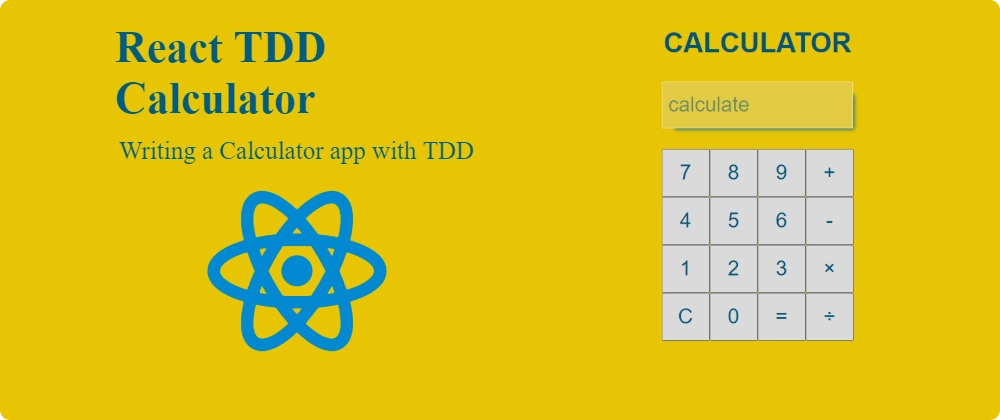
This 2021 TDD exercise uses a legacy Create React App setup. CRA is deprecated for new apps; focus on the testing steps below.
Let us build a simple web-app calculator with a test-first approach and React!
I highly suggest you follow this exercise if you are already familiar with React, and want to also step up your testing game. 🌟
We will approach building a simple app, with only the basic calculation functions - but most importantly - we will follow a Test Driven Developmnet approach.
Test-driven development (TDD) is a development technique where you must first write a test that fails before you write new functional code. TDD is being quickly adopted by agile software developers for development of application source code and is even being adopted by Agile DBAs for database development. (agiledata.org)
Setup
The original exercise used create-react-app with testing already configured. We will also choose the TypeScript template. So open a terminal and run:
npx create-react-app calculator --template typescript
cd calculator
Open an editor. I'll use VS Code:
code .
Have two terminal windows open:
- one to run
npm start - one to run
npm run test
Let's start coding
Start coding you say? Funny. I thought we were doing TDD. Of course, we want to create a failing test first. But where do we start?
Go to App.test.tsx, delete the existing test and write:
test("renders calculator", () => {
  render(<App />);
  const calculatorElement = screen.getByText(/calculator/i);
  expect(calculatorElement).toBeInTheDocument();
});
And there you go, our terminal that runs the tests should output:
Tests: 1 failed, 1 total
Our test just naively checks that we have somewhere in our app the text calculator rendered.
So we will create a Calculator.tsx file with:
const Calculator = () => <h1>Calculator</h1>;

export default Calculator;
The test still fails. Well.. We are not yet rendering our Calculator component. Let's fix that. Go to 'App.tsx':
import React from "react";
import "./App.css";
import Calculator from "./Calculator";

function App() {
  return (
    <div className="App">
      <main>
        <Calculator />
      </main>
    </div>
  );
}

export default App;
✅Tests: 1 passed, 1 total - great we passed our first test. Now what?
Do we build the code for the calculator?
❌ Of course not, we write another failing test, now in 'Calculator.test.tsx', to show the calculator numbers:
import { render, screen } from "@testing-library/react";
import React from "react";
import Calculator from "./Calculator";

describe("<Calculator />", () => {
  it("shows numbers", () => {
    render(<Calculator />);
    const numbers = [0, 1, 2, 3, 4, 5, 6, 7, 8, 9];

    numbers.forEach((n) => {
      expect(screen.getByText(n.toString())).toBeInTheDocument();
    });
  });
});
And in Calculator.tsx:
+ const numbers = [0, 1, 2, 3, 4, 5, 6, 7, 8, 9];
+ const Calculator = () => {
+   return (
+     <div className="calculator">
      <h1>Calculator</h1>
+       {numbers.map((n) => (
+         <button key={n}>{n.toString()}</button>
+       ))}
+     </div>
+   );
+ };

export default Calculator;
Alright, at this point, if we look at the app we have something like:
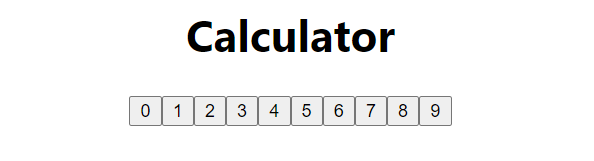
Render rows of numbers
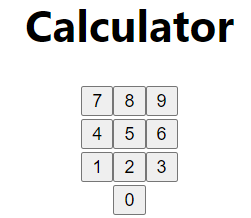
We want to show our numbers in rows:
Row 1: [7, 8, 9]
Row 2: [4, 5, 6]
Row 3: [1, 2, 3]
Row 4: [0]
Let's arrange the buttons into rows. This is layout, so we do not need a test that counts the rows.
Update the markup:
const rows = [[7, 8, 9], [4, 5, 6], [1, 2, 3], [0]];

const Calculator = () => {
  return (
    <div className="calculator">
      <h1>Calculator</h1>
      <div>
        {rows.map((row) => {
          return (
            <div key={row.toString()}>
              {row.map((n) => (
                <button key={n}>{n.toString()}</button>
              ))}
            </div>
          );
        })}
      </div>
    </div>
  );
};

export default Calculator;
Let's also check our app:
Show calculator operators
Test to show operators:
  it("shows calculation operators", () => {
    render(<Calculator />);
    const calcOperators = ["+", "-", "×", "÷"];

    calcOperators.forEach((operator) => {
      expect(screen.getByText(operator.toString())).toBeInTheDocument();
    });
  });
Pass the test:
const rows = [[7, 8, 9], [4, 5, 6], [1, 2, 3], [0]];
+ const calcOperators = ["+", "-", "×", "÷"];
const Calculator = () => {
  return (
    <div className="calculator">
      <h1>Calculator</h1>
      <div>
        {rows.map((row) => {
          return (
            <div key={row.toString()}>
              {row.map((n) => (
                <button key={n}>{n.toString()}</button>
              ))}
            </div>
          );
        })}
+       {calcOperators.map((c) => (
+         <button key={c}>{c.toString()}</button>
+       ))}
      </div>
    </div>
  );
};

export default Calculator;
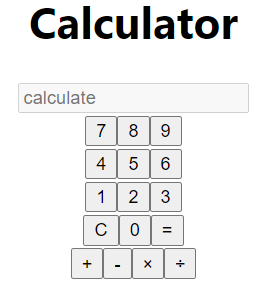
Great! It looks terrible 😅. Don't worry, we will fix the styles later.
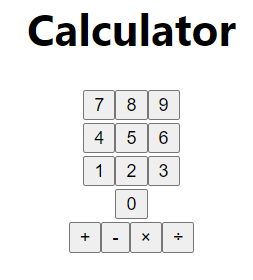
Show an equal sign & clear sign:
Tests:
  it("renders equal", () => {
    render(<Calculator />);
    const equalSign = "=";
    expect(screen.getByText(equalSign)).toBeInTheDocument();
  });

  it("renders clear sign", () => {
    render(<Calculator />);
    const clear = "C";
    expect(screen.getByText(clear)).toBeInTheDocument();
  });
Great, 2 tests are failing. To fix:
import { Fragment } from "react";

const rows = [[7, 8, 9], [4, 5, 6], [1, 2, 3], [0]];
const calcOperators = ["+", "-", "×", "÷"];
const equalSign = "=";
const clear = "C";
const Calculator = () => {
  return (
    <div className="calculator">
      <h1>Calculator</h1>
      <div>
        {rows.map((row, i) => {
          return (
            <Fragment key={row.toString()}>
              <div>
                {i === 3 && <button>{clear}</button>}
                {row.map((n) => (
                  <button key={n}>{n}</button>
                ))}
                {i === 3 && <button>{equalSign}</button>}
              </div>
            </Fragment>
          );
        })}
        {calcOperators.map((c) => (
          <button key={c}>{c.toString()}</button>
        ))}
      </div>
    </div>
  );
};

export default Calculator;
Show an input for values to be calculated
Test:
  it("renders an input", () => {
    render(<Calculator />);
    expect(screen.getByPlaceholderText("calculate")).toBeInTheDocument();
  });
We always want this input to be disabled, so we will also add a test for that:
  it("renders an input disabled", () => {
    render(<Calculator />);
    expect(screen.getByPlaceholderText("calculate")).toBeDisabled();
  });
Implement the input:
+ import { Fragment, useState } from "react";

const rows = [[7, 8, 9], [4, 5, 6], [1, 2, 3], [0]];
const calcOperators = ["+", "-", "×", "÷"];
const equalSign = "=";
const clear = "C";
const Calculator = () => {
+  const [value, setValue] = useState("");
  return (
    <div className="calculator">
      <h1>Calculator</h1>
+     <input
+      type="text"
+      value={value}
+      placeholder="calculate"
+      disabled
+     />
      <div>
        {rows.map((row, i) => {
          return (
            <Fragment key={row.toString()}>
              <div>
                {i === 3 && <button>{clear}</button>}
                {row.map((n) => (
                  <button key={n}>{n}</button>
                ))}
                {i === 3 && <button>{equalSign}</button>}
              </div>
            </Fragment>
          );
        })}
        {calcOperators.map((c) => (
          <button key={c}>{c.toString()}</button>
        ))}
      </div>
    </div>
  );
};

export default Calculator;
Make it display the user's inputs
Tests:
  it("displays users inputs", async () => {
    render(<Calculator />);
    const one = screen.getByText("1");
    const two = screen.getByText("2");
    const plus = screen.getByText("+");
    fireEvent.click(one);
    fireEvent.click(plus);
    fireEvent.click(two);

    const result = await screen.findByPlaceholderText("calculate");
    // @ts-ignore
    expect(result.value).toBe("1+2");
  });

  it("displays multiple users inputs", async () => {
    render(<Calculator />);
    const one = screen.getByText("1");
    const two = screen.getByText("2");
    const three = screen.getByText("3");
    const five = screen.getByText("5");
    const divide = screen.getByText("÷");
    const mul = screen.getByText("×");
    const minus = screen.getByText("-");
    fireEvent.click(three);
    fireEvent.click(mul);
    fireEvent.click(two);
    fireEvent.click(minus);
    fireEvent.click(one);
    fireEvent.click(divide);
    fireEvent.click(five);

    const result = await screen.findByPlaceholderText("calculate");
    // @ts-ignore
    expect(result.value).toBe("3×2-1÷5");
  });
Pass the tests:
               <div>
                 {i === 3 && <button>{clear}</button>}
                 {row.map((n) => (
-                  <button key={n}>{n}</button>
+                  <button
+                    onClick={() => setValue(value.concat(n.toString()))}
+                    key={n}
+                  >
+                    {n}
+                  </button>
                 ))}
                 {i === 3 && <button>{equalSign}</button>}
               </div>
         {calcOperators.map((c) => (
-          <button key={c}>{c.toString()}</button>
+          <button onClick={() => setValue(value.concat(c))} key={c}>
+            {c.toString()}
+          </button>
         ))}
Can it calculate?
Alright, so up until now we just wrote some tests to check if our calculator displays the right stuff, but let us write some tests for it to actually calculate something:
  it("calculate based on users inputs", async () => {
    render(<Calculator />);
    const one = screen.getByText("1");
    const two = screen.getByText("2");
    const plus = screen.getByText("+");
    const equal = screen.getByText("=");
    fireEvent.click(one);
    fireEvent.click(plus);
    fireEvent.click(two);
    fireEvent.click(equal);

    const result = await screen.findByPlaceholderText("calculate");

    expect(
      (result as HTMLElement & {
        value: string;
      }).value
    ).toBe("3");
  });

  it("calculate based on multiple users inputs", async () => {
    render(<Calculator />);
    const one = screen.getByText("1");
    const two = screen.getByText("2");
    const three = screen.getByText("3");
    const five = screen.getByText("5");
    const divide = screen.getByText("÷");
    const mul = screen.getByText("×");
    const minus = screen.getByText("-");
    const equal = screen.getByText("=");

    fireEvent.click(three);
    fireEvent.click(mul);
    fireEvent.click(two);
    fireEvent.click(minus);
    fireEvent.click(one);
    fireEvent.click(divide);
    fireEvent.click(five);
    fireEvent.click(equal);

    const result = await screen.findByPlaceholderText("calculate");
    expect(
      (result as HTMLElement & {
        value: string;
      }).value
    ).toBe("5.8");
  });
Notice in our second test we also check that the operations are executed in the correct order:
3*2-1÷5 = 6-0.2 = 5.8
And, let us make this pass. At this stage, we can use the unsafe eval function, which we will refactor later. Remember, we only need to pass the tests. We can always write a test to propose why our current implementation is not ok.
const rows = [[7, 8, 9], [4, 5, 6], [1, 2, 3], [0]];
 const calcOperators = ["+", "-", "×", "÷"];
 const equalSign = "=";
 const clear = "C";
+
+const calculateExpression = (expression: string) => {
+  const mulRegex = /×/g;
+  const divRegex = /÷/g;
+
+  const toEvaluate = expression.replace(mulRegex, "*").replace(divRegex, "/");
+
+  // todo - refactor eval later
+  const result = eval(toEvaluate);
+  return typeof result === "number" && Number.isFinite(result) ? result : undefined;
+};
+
 const Calculator = () => {
   const [value, setValue] = useState("");
+
+  const calculate = () => {
+    const results = calculateExpression(value);
+    setValue(results === undefined ? "" : String(results));
+  };
+
   return (
     <div className="calculator">
       <h1>Calculator</h1>
@@ -29,7 +47,7 @@ const Calculator = () => {
                     {n}
                   </button>
                 ))}
-                {i === 3 && <button>{equalSign}</button>}
+                {i === 3 && <button onClick={calculate}>{equalSign}</button>}
               </div>
             </Fragment>
           );
Can use clear button
The test:
  it("can clear results", async () => {
    render(<Calculator />);
    const one = screen.getByText("1");
    const two = screen.getByText("2");
    const plus = screen.getByText("+");
    const clear = screen.getByText("C");
    fireEvent.click(one);
    fireEvent.click(plus);
    fireEvent.click(two);

    fireEvent.click(clear);

    const result = await screen.findByPlaceholderText("calculate");
    expect(
      (result as HTMLElement & {
        value: string;
      }).value
    ).toBe("");
  });
Easy:
const Calculator = () => {
     setValue(results === undefined ? "" : String(results));
   };
+
+  const clearValue = () => setValue("");
+
   return (
     <div className="calculator">
       <h1>Calculator</h1>
@@ -38,7 +40,7 @@ const Calculator = () => {
           return (
             <Fragment key={row.toString()}>
               <div>
-                {i === 3 && <button>{clear}</button>}
+                {i === 3 && <button onClick={clearValue}>{clear}</button>}
                 {row.map((n) => (
Back to calculating stuff
Alright, so at this point, we maybe want to test more scenarios for the calculate function. So I think it makes more sense to write those tests directly on the calculateExpression function.
So we will export it and write some extra tests:
describe("calculateExpression", () => {
  it("correctly computes for 2 numbers with +", () => {
    expect(calculateExpression("1+1")).toBe(2);
    expect(calculateExpression("10+10")).toBe(20);
    expect(calculateExpression("11+345")).toBe(356);
  });

  it("correctly substracts 2 numbers", () => {
    expect(calculateExpression("1-1")).toBe(0);
    expect(calculateExpression("10-1")).toBe(9);
    expect(calculateExpression("11-12")).toBe(-1);
  });

  it("correctly multiples 2 numbers", () => {
    expect(calculateExpression("1×1")).toBe(1);
    expect(calculateExpression("10×0")).toBe(0);
    expect(calculateExpression("11×-12")).toBe(-132);
  });

  it("correctly divides 2 numbers", () => {
    expect(calculateExpression("1÷1")).toBe(1);
    expect(calculateExpression("10÷2")).toBe(5);
    expect(calculateExpression("144÷12")).toBe(12);
  });

  it("division by 0 returns undefined", () => {
    expect(calculateExpression("1÷0")).toBe(undefined);
  });
});
The division-by-zero test checks that we return undefined rather than Infinity. Let's also catch invalid expressions.
-const calculateExpression = (expression: string) => {
+export const calculateExpression = (expression: string) => {
   const mulRegex = /×/g;
   const divRegex = /÷/g;

   const toEvaluate = expression.replace(mulRegex, "*").replace(divRegex, "/");

-  // todo - refactor eval later
-  const result = eval(toEvaluate);
-  return typeof result === "number" && Number.isFinite(result) ? result : undefined;
+  try {
+
+    // todo - refactor eval later
+    const result = eval(toEvaluate);
+
+    return typeof result === "number" && Number.isFinite(result) ? result : undefined;
+  } catch (err) {
+    console.error(err);
+    return undefined;
+  }
 };
Ok, more tests for some extra cases:
  it("handles multiple operations", () => {
    expect(calculateExpression("1÷1×2×2+3×22")).toBe(70);
  });

  it("handles trailing operator", () => {
    expect(calculateExpression("1÷1×2×2+3×22+")).toBe(70);
  });

  it("handles empty expression", () => {
    expect(calculateExpression("")).toBe(undefined);
  });
Watercooler 🌊
Alright, if you made it until here, congrats! 🙌 You are learning how to write code in a TDD way.
Please notice, at this point, the mentality is to add tests and see what tests fail. Maybe some will pass, some will fail, but we want to make sure we have a test-first approach and we are careful with the quality of the tests. Passing tests cover the cases we checked. Keep looking for missing cases.
So let us fix the 2 failing tests we have now:
 const clear = "C";


+const getLastChar = (str: string) => (str.length ? str[str.length - 1] : "");
+const isNumber = (str: string) => !isNaN(Number(str));
+
 export const calculateExpression = (expression: string) => {
+  if (!expression || expression.length === 0) {
+    return;
+  }
+
   const mulRegex = /×/g;
   const divRegex = /÷/g;

-  const toEvaluate = expression.replace(mulRegex, "*").replace(divRegex, "/");
+  let toEvaluate = expression.replace(mulRegex, "*").replace(divRegex, "/");

   try {
+
+    const lastCharaterIsNumber = isNumber(getLastChar(toEvaluate));
+
+    if (!lastCharaterIsNumber) {
+      toEvaluate = toEvaluate.slice(0, -1);
+    }
+
Get rid of eval
Remember when we said we will change eval to something else. Yes, we want to avoid it as our linter and our common sense dictates we should not use it.
Luckily there is a package that does exactly what we want. Evaluate an arithmetic expression without JavaScript eval:
yarn add mathjs @types/mathjs
+import { evaluate } from "mathjs";
-    // todo - refactor eval later
-    const result = eval(toEvaluate);
+    const result = evaluate(toEvaluate);
What... our tests still pass? Cool!
Style the app
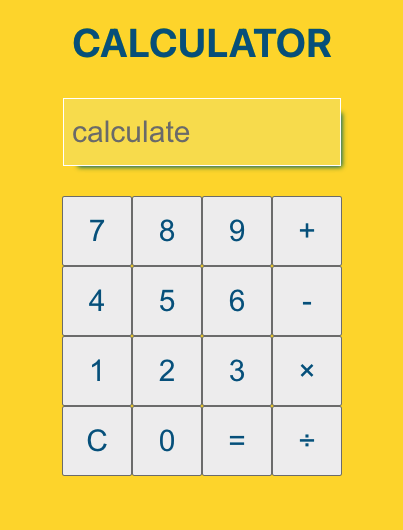
But the app is really ugly.. Let's fix that.
First, let us declare some variables in the index.css:
:root {
  --theme-color-dark-10: #006ba1;
  --theme-color-dark-20: #005a87;
  --theme-color-background: #fed800;
}
In the body we will just add the background color and leave the rest of the styles as they are:
 body {
+  background-color: var(--theme-color-background);
We will need to add a bit more structure to our Calculator.tsx:
import { Fragment, useState } from "react";
import { evaluate } from "mathjs";
import "./Calculator.css";

const rows = [[7, 8, 9], [4, 5, 6], [1, 2, 3], [0]];
const calcOperators = ["+", "-", "×", "÷"];
const equalSign = "=";
const clear = "C";

const getLastChar = (str: string) => (str.length ? str[str.length - 1] : "");
const isNumber = (str: string) => !isNaN(Number(str));

export const calculateExpression = (expression: string) => {
  if (!expression || expression.length === 0) {
    return;
  }

  const mulRegex = /×/g;
  const divRegex = /÷/g;

  let toEvaluate = expression.replace(mulRegex, "*").replace(divRegex, "/");

  try {

    const lastCharaterIsNumber = isNumber(getLastChar(toEvaluate));

    if (!lastCharaterIsNumber) {
      toEvaluate = toEvaluate.slice(0, -1);
    }

    const result = evaluate(toEvaluate);

    return typeof result === "number" && Number.isFinite(result) ? result : undefined;
  } catch (err) {
    console.error(err);
    return undefined;
  }
};

const Calculator = () => {
  const [value, setValue] = useState("");

  const calculate = () => {
    const results = calculateExpression(value);
    setValue(results === undefined ? "" : String(results));
  };

  const clearValue = () => setValue("");

  return (
    <div className="calculator">
      <h1>Calculator</h1>
      <input
        type="text"
        value={value}
        aria-label="Calculation result"
        placeholder="calculate"
        disabled
      />
      <div className="calculator-buttons-container">
        <div>
          {rows.map((row, i) => {
            return (
              <Fragment key={row.toString()}>
                <div>
                  {i === 3 && <button onClick={clearValue}>{clear}</button>}
                  {row.map((n) => (
                    <button
                      key={n}
                      onClick={() => setValue(value.concat(n.toString()))}
                    >
                      {n}
                    </button>
                  ))}
                  {i === 3 && <button onClick={calculate}>{equalSign}</button>}
                </div>
              </Fragment>
            );
          })}
        </div>
        <div className="calculator-operators">
          {calcOperators.map((c) => (
            <button key={c} onClick={() => setValue(value.concat(c))}>
              {c.toString()}
            </button>
          ))}
        </div>
      </div>
    </div>
  );
};

export default Calculator;
We will also add a Calculator.css file, with:
.calculator > h1 {
  color: var(--theme-color-dark-20);
  text-transform: uppercase;
}

.calculator input {
  height: 2.5rem;
  width: 13rem;
  padding: 0.4rem;
  border: 1px solid white;
  margin: 0.3rem 0.3rem 1.5rem 0.3rem;
  font-size: 1.5rem;
  color: var(--theme-color-dark-20);
  box-shadow: 8px 8px 5px -7px var(--theme-color-dark-10);
}

.calculator button {
  width: 3.5rem;
  height: 3.5rem;
  font-size: 1.5rem;
  color: var(--theme-color-dark-20);
}

.calculator-buttons-container {
  display: flex;
  align-items: center;
  justify-content: center;
}

.calculator-operators {
  display: flex;
  flex-direction: column;
}
Looks better.
Conclusions
I want to stop here. Try adding tests for continuing after a result, invalid input and calculateExpression("8÷0.5").
If you are up for it, fix them in a TDD style 🔥.
Here's the repo for this coding exercise.